The driver app that works where your trucks work — including offline.
iOS and Android. Production-ready for bulk haulage. Job assignments, status updates, proof of delivery capture and break records — all in a single mobile workflow that synchronises when connectivity returns.
Most driver apps are built for parcel fleets. This one is built for bulk haulage.
Parcel delivery apps are built around address lists, barcode scans and route optimisation for metro areas. Bulk haulage looks nothing like that. Your drivers operate between quarries, earthworks sites, construction yards and rural locations — often without reliable mobile signal. The material being moved, the loading instructions, the site contact and the POD expectations are different from a courier run.
The HaulageOps driver app is built around the bulk haulage job lifecycle: receive the job, navigate to the pickup, confirm loading, transit to the delivery site, capture proof of delivery with photo and customer signature, and record breaks. Every step is designed for a driver sitting in a cab, often on rough ground, with a phone rather than a purpose-built device.
What the driver app does
- Receives job assignments with push notification via Firebase FCM
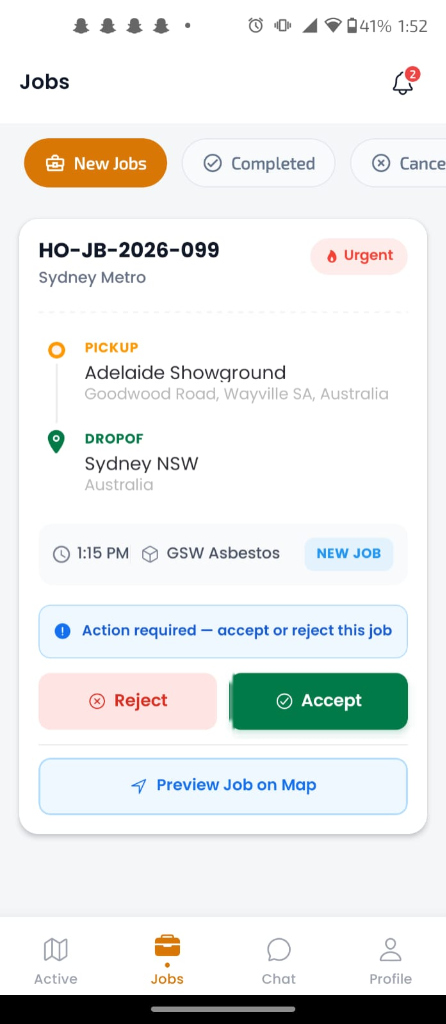
- Displays full job details: material, pickup site, delivery site, instructions, scheduled time
- Six-stage status update workflow driven by the driver
- Transmits live GPS position to the dispatch board
- POD capture: photograph, document upload, customer signature
- Break and rest period recording for fatigue management compliance
- Driver availability scheduling — set available hours for the week
- Works offline — queues updates and syncs on reconnect
- Multiple jobs visible — driver can see their full day's work
Six status stages. Driver-initiated. Real-time on the dispatch board.
Every status update the driver makes appears on the dispatcher's board within seconds via the Socket.io real-time connection. No one needs to call the driver to find out where they are or what stage the job is at.
En Route
Driver confirms they are on their way to the pickup site. GPS tracking begins transmitting position to the dispatch board. Dispatch can see the truck moving toward the site.
At Pickup
Driver arrives at the pickup site and taps At Pickup. Timestamp is recorded. Site instructions are visible in full. Driver can view any special loading or access notes attached to the job.
Loading
Driver taps Loading when the loading process begins. This stage is relevant for bulk material where loading time is variable — quarry, aggregate, fill material. The timestamp creates an accurate loading duration record.
In Transit
Driver confirms load is complete and they are moving to the delivery site. Live GPS position continues on the board. This is the moment the client can see in their portal that the delivery is en route.
At Delivery
Driver arrives at the delivery site. Timestamp recorded. Driver can view delivery site access instructions before tapping Complete.
Complete + POD
Driver captures proof of delivery: photograph of the delivered material, document upload (scale docket, delivery note), and customer signature via the touchscreen signature pad. Job is marked complete. Docket is attached to the job record immediately. Invoice is ready to generate.
Works without signal. Synchronises when connectivity returns.
Quarries, rural depots, earthworks sites and construction yards frequently have limited or no mobile coverage. A driver app that requires a constant connection is not a viable tool for bulk haulage. The HaulageOps driver app is built with offline capability confirmed in production.
What works without signal
- View all assigned job details already loaded before losing signal
- Progress through job status stages — updates are queued locally
- Capture photos and customer signatures for POD — stored locally
- Record break and rest periods with timestamps
- View site instructions and job notes already cached
When the device reconnects, all queued status updates, captured photos, signatures and break records synchronise to the HaulageOps server in the order they were made.
What requires connectivity
- •Receiving new job assignments — push notifications require a connection
- •Live GPS position transmission to the dispatch board
- •Uploading documents captured during a job (queued until reconnected)
- •Accessing job details for jobs assigned while offline
For jobs assigned before going offline, the driver has everything they need. The system does not fail mid-job because a quarry has poor signal.
Photo, document upload, customer signature — captured at delivery and attached to the job record.
Paper dockets get lost, damaged, delayed, or never returned to the office. When they are missing, invoicing stops. The HaulageOps driver app replaces the paper docket with a digital POD workflow captured at the moment of delivery. The evidence is attached to the job record instantly — no scanning, no chasing, no delay.
Photograph capture
Driver photographs the delivered material, the site, the load drop point — whatever your POD standard requires. The photo is time-stamped, geotagged where signal allows, and stored in Azure Blob Storage linked to the job record.
Document upload
Scale dockets, weigh bridge tickets, delivery notes and any paper received at site can be photographed and uploaded directly from the app. All attached to the completed job record for immediate access by dispatch, finance and the client portal.
Customer signature
The app includes a touchscreen signature pad. The customer or site representative signs directly on the driver's device. The signature is captured as an image, timestamped, and stored alongside the photo and documents as part of the POD record.
See: Proof of Delivery and Digital Dockets — how POD fits into the broader billing and compliance workflow.
What changes when drivers use the app instead of paper dockets.
| Driver activity | Paper docket workflow | HaulageOps driver app |
|---|---|---|
| Receive job assignment | Phone call or WhatsApp | Push notification with full job details |
| Find pickup location | Verbal instructions or text | Address shown in job details, Google Maps routing |
| Update dispatch on status | Call or text the office | Tap a status button — dispatch sees it instantly |
| Capture delivery evidence | Paper docket, often incomplete | Photo + document + customer signature in one flow |
| Return docket to office | End of day — sometimes days later | Attached to job record at moment of delivery |
| Record break times | Paper logbook, easy to forget | Start/stop break in app with automatic timestamps |
| Work in areas with no signal | No change — paper always works | App works offline, syncs on reconnect |
| Invoice follow-up time | Waits for docket return | POD attached at completion — invoice ready immediately |
The driver app connects to these platform areas.
Dispatch Management
Job assignments flow from the dispatch board to the driver app. Status updates flow back. Live GPS position shows on the dispatch board. Dispatcher and driver are connected without needing to call each other.
Proof of Delivery
POD captured in the driver app is the foundation of the digital docket workflow. Photo, documents and signature captured at delivery attach to the job record and are immediately available for invoicing and client portal access.
Driver Management
Driver records, licence and medical document expiry, induction records and availability scheduling are managed in the admin panel. The driver app reflects each driver's identity and compliance standing in the system.
Also see: Digital Dockets — the full picture of how app-captured POD eliminates the paper docket process from delivery to invoice.
Frequently asked about the HaulageOps driver app.
Which operating systems does the driver app support?
The HaulageOps driver app is available for both iOS (iPhone) and Android. It is a production-ready mobile application, not a mobile browser wrapper. Drivers do not need a specific device model — any reasonably current iPhone or Android smartphone running a supported OS version is sufficient. There is no requirement for a dedicated device or ruggedised hardware, though operators may choose to provide company phones.
Does the app really work without mobile signal?
Yes — offline capability is confirmed in production. When a driver loses mobile connectivity, the app continues to function for all current assigned jobs. Status updates, break records and POD captures are stored locally on the device. When connectivity is restored — leaving a quarry, reaching the main road, returning to a coverage area — everything synchronises automatically in the background. The driver does not need to do anything to trigger the sync.
How does POD synchronise to the job record?
When a driver captures a photo, uploads a document, or records a customer signature, the data is immediately uploaded to Azure Blob Storage if the device is connected. If offline, the capture is queued locally and uploaded the moment connectivity returns. Once uploaded, the file is linked to the job record in HaulageOps and is accessible to dispatch, finance and management immediately — and to the client through the client portal.
Can a driver see multiple jobs at once?
Yes. The driver app shows all jobs assigned to that driver — current, upcoming and completed. A driver doing multiple runs in a day can see their full job queue and progress through each job sequentially. Jobs assigned for future dates are also visible so drivers can plan ahead. Completed jobs with their POD records remain accessible in the driver's history.
What does break recording in the app cover?
Drivers can start and stop break periods directly in the app. Each break is recorded with start time, end time and duration, associated with the driver's identity and the date. This record is relevant for fatigue and rest compliance obligations — particularly for operators working under Chain of Responsibility frameworks. Note: the HaulageOps driver app is not an Electronic Work Diary (EWD) or Electronic Logging Device (ELD). An ELD/EWD is on the product roadmap. The break recording feature provides a structured digital record to supplement — not replace — formal fatigue management obligations.
How are drivers notified of new job assignments?
When a dispatcher assigns a job to a driver, the driver receives a push notification on their device via Firebase FCM (Firebase Cloud Messaging). The notification includes the key job details — client, material, pickup site, delivery time. Tapping the notification opens the job directly in the app. Notifications are only sent when the device is connected; if a driver is offline when a job is assigned, the notification appears when connectivity is restored and the job is waiting in their queue.